
빌드에서 모듈을 찾지 못함, 인스톨 유니티 허브를 눌러 확인해보면 설치가 되어있음
삭제하고 재설치
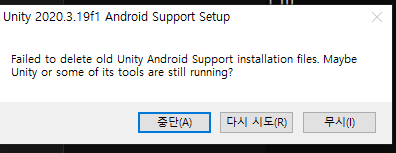
경고 팝업 나옴
빌드 오류 생김
1. 빌드 에러 (UnityException: JDK not found)
- 따로 설치 해서 해결
2. 빌드 에러 (Android SDK not found Unable to detect SDK in the selected directory)
-따로 설치 해서 해셜
3. 빌드 에러 (Gradle build failed.)

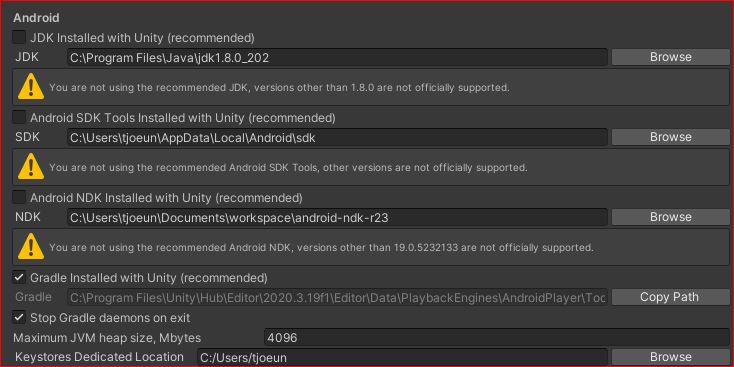


관리자 권한 없이 설치된 안드로이드 모듈이 문제를 일으키는것 같음.
https://forum.unity.com/threads/install-failed-validation-failed.1147151/
Install failed: Validation Failed
the title is the error ( Install failed: Validation Failed) how do i fix this?
forum.unity.com
| Quit the Unity Hub from the icon tray (the thing bottom right) and relaunch the Unity Hub as administrator. This is apparently an issue with the new hub beta. Someone shared this solution in the "Share your Unity Hub 3.0 Beta Feedback Here" thread. It worked for me, if it doesn't work for you close it from the task manager and try opening it as admin again. If the error persists, maybe there's some hope in the official thread I posted right there! |
Feedback - Share your Unity Hub 3.0 Beta Feedback Here
Hi! Thanks for coming here to share some feedback and ideas. First, a few things to keep in mind: Hub 3.0 Beta 1 should work for your daily needs. If...
forum.unity.com
| Just managed to solve ages-old infamous "validation failed" error. In case it helps anyone, the problem is that the installer cannot create folder "Unity" and its sub-folders in "Program Files", even if you start Hub application as admin. The solution is: 1. Wait till your download completes to 99% and it shows the "validation failed message. Do not close Hub application, just leave it as it is. 2. Go to C:\Program Files and create Unity folder manually (it may require admin privileges). Then inside Unity folder, create Hub folder and inside the Hub folder, create Editor folder. So now you should have the full path C:\Program Files\Unity\Hub\Editor on your machine. 3. Now go back to Hub application and click the small Refresh button that show on top of the validation error. It will check again and continue successfully. At least it did for me. |
유니티 허브 3.0에서 관리자 권한 없이 안드로이드 모듈을 설치하면, 설치가 제대로 되지 않음.
해결
설치되어있는 유니티, 안드로이드 모듈을 모두 삭제하고
유니티 허브를 관리자 권한으로 실행하고 유니티 안드로이드 모듈을 설치시 관리자 권한으로 설치한다