랜덤한 방향으로 이동하는 몬스터
- 델타타임을 누적하는 동안 Idle, 이동 시간만큼 누적되면 Move 코루틴 실행
- 랜덤을 사용하여 랜덤한 벡터를 노멀라이즈 하여 방향으로 사용, 일정한 거리 이동
- bool타입의 변수를 코루틴의 시작과 끝에 배치하여 코루틴이 실행되는 동안 이동시간을 누적하지 않음
using System.Collections;
using System.Collections.Generic;
using UnityEngine;

public class TestRangedMonster : MonoBehaviour
{
    //Editor에서 사용하는 변수
    public float sight;
    public float attackRange;

    public float moveDelta;
    public float moveSpan;

    public GameObject target;

    private void Init()
    {
        this.sight = 5;
        this.attackRange = 0.5f;

        this.moveSpan = 1;
    }
    void Start()
    {
        this.Init();
    }

    void Update()
    {
        if (!this.moveRunning)   //moveRunning이 false라면
        {
            this.moveDelta += Time.deltaTime;
        }

        if (this.moveDelta > this.moveSpan)
        {
            this.moveDelta = 0;

            if (this.moveRoutine != null)
            {
                StopCoroutine(this.moveRoutine);
            }
            this.moveRoutine = StartCoroutine(this.Move());
        }
    }

    private Coroutine moveRoutine;
    public bool moveRunning;

    private IEnumerator Move()
    {
        this.moveRunning = true;
        //Vector2 dir = Vector2.zero - new Vector2(Random.Range(-0.5f, 0.5f), Random.Range(-0.5f, 0.5f));
        Vector2 dir = new Vector2(Random.Range(-1, 1), Random.Range(-1, 1)).normalized;
        float delta = 0;
        while (2 > delta)
        {
            this.transform.Translate(dir * 0.5f * Time.deltaTime);
            delta += Time.deltaTime;
            yield return null;
        }
        this.moveRunning = false;
    }
}
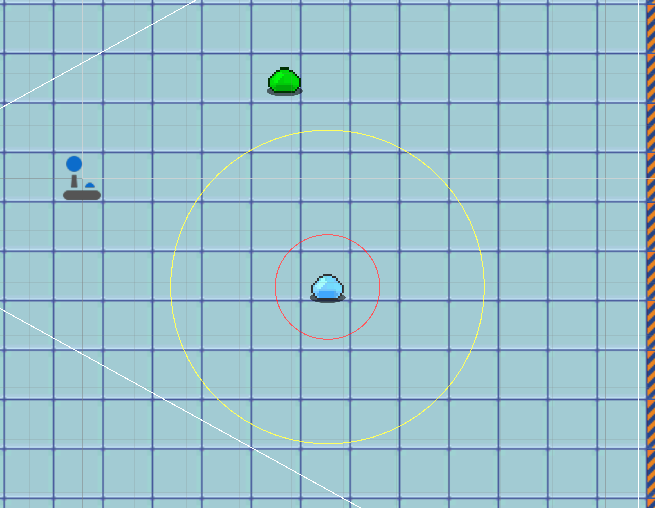
몬스터 시야, 사정거리 표시 (씬에 원그리기)
- 씬에서만 표시된다

Asset에 Editor 폴더 생성
- 스크립트가 Editor폴더에 있어야 함

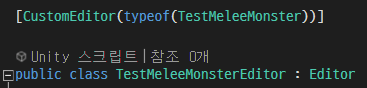
[CustomEditor(typeof(TestMeleeMonster))]


에디터를 사용할 스크립트
using System.Collections;
using System.Collections.Generic;
using UnityEngine;
using UnityEditor;

[CustomEditor(typeof(TestMeleeMonster))]

public class TestMeleeMonsterEditor : Editor
{
    private TestMeleeMonster testMeleeMonster;

    void OnSceneGUI()
    {
        this.testMeleeMonster = this.target as TestMeleeMonster;
        Handles.color = Color.red;
        var center = this.testMeleeMonster.transform.position;
        //var normal = this.testMeleeMonster.transform.up;
        var normal = this.testMeleeMonster.transform.position - new Vector3(this.testMeleeMonster.transform.position.x, this.testMeleeMonster.transform.position.y, this.testMeleeMonster.transform.position.z + 1);

        var radius = this.testMeleeMonster.attackRange;
        //https://answers.unity.com/questions/842981/draw-2d-circle-with-gizmos.html
        Handles.DrawWireDisc(center, normal, radius);


        Handles.color = Color.yellow;
        Handles.DrawWireDisc(center, normal, this.testMeleeMonster.sight);
    }
}
https://docs.unity3d.com/ScriptReference/Editor.OnSceneGUI.html
Unity - Scripting API: Editor.OnSceneGUI()
Success! Thank you for helping us improve the quality of Unity Documentation. Although we cannot accept all submissions, we do read each suggested change from our users and will make updates where applicable. Close
docs.unity3d.com
https://docs.unity3d.com/ScriptReference/Handles.DrawWireDisc.html
Unity - Scripting API: Handles.DrawWireDisc
Success! Thank you for helping us improve the quality of Unity Documentation. Although we cannot accept all submissions, we do read each suggested change from our users and will make updates where applicable. Close
docs.unity3d.com
플레이어 캐릭터가 시야에 들어오면 플레이어 캐릭터를 쫒는다
GameObject.FindGameObjectsWithTag로 플레이어 태그를 가진 게임 오브젝트를 배열로 가져온다
배열을 돌며 플레이와 몬스터의 거리를 계산한다.
거리가 시가보다 가까워지면 플레이어를 쫒는다.
콜라이더나 레이를 쏘는 방법도 이용해서 만들어 봐야겠다.
using System.Collections;
using System.Collections.Generic;
using UnityEngine;

public class TestMeleeMonster : MonoBehaviour
{
    //Editor에서 사용하는 변수
    public float sight;
    public float attackRange;

    public float speed;

    public float moveDelta;
    public float moveSpan;

    public GameObject[] targets;
    public GameObject target;

    private void Init()
    {
        this.sight = 5;
        this.attackRange = 0.5f;

        this.speed = 3;

        this.moveSpan = 1;
    }
    void Start()
    {
        this.Init();
    }

    void Update()
    {
        if (this.targets.Length == 0)
        {
            this.SearchTarget();
        }

        if (this.targets.Length > 0 && this.target == null)
        {
            for (int i = 0; i < this.targets.Length; i++)
            {
                float distance = Vector3.Distance(this.targets[i].transform.position, this.transform.position);
                if (distance < this.sight)
                {
                    this.target = this.targets[i];
                }
            }
        }

        if(!this.moveRunning)   //moveRunning이 false라면
        {
            this.moveDelta += Time.deltaTime;
        }

        if (this.target == null)
        {
            if (this.moveDelta > this.moveSpan)
            {
                this.moveDelta = 0;

                if(this.moveRoutine != null)
                {
                    StopCoroutine(this.moveRoutine);
                }
                this.moveRoutine = StartCoroutine(this.Move());
            }
        }
        else
        {
            Vector2 dir = (this.target.transform.position - this.transform.position).normalized;
            this.transform.Translate(dir * this.speed * Time.deltaTime);
        }
    }

    private void SearchTarget()
    {
        this.targets = GameObject.FindGameObjectsWithTag("Player");
    }

    private Coroutine moveRoutine;
    public bool moveRunning;

    private IEnumerator Move()
    {
        this.moveRunning = true;
        //Vector2 dir = Vector2.zero - new Vector2(Random.Range(-0.5f, 0.5f), Random.Range(-0.5f, 0.5f));
        Vector2 dir = new Vector2(Random.Range(-1, 1), Random.Range(-1, 1)).normalized;
        float delta = 0;
        while(2 > delta)
        {
            this.transform.Translate(dir * 0.5f * Time.deltaTime);
            delta += Time.deltaTime;
            yield return null;
        }
        this.moveRunning = false;
    }
}
'[ProjectT] > 개발일지' 카테고리의 다른 글
| [21.12.07] 프로토타입 영상자료 (0) | 2022.03.28 |
|---|---|
| [21.12.02] 몬스터 랜덤한 방향으로 이동 & 공격 (0) | 2021.12.02 |
| [21.11.24] 조이스틱 공격_02 (0) | 2021.11.24 |
| [21.11.23] 조이스틱 공격_01 (0) | 2021.11.24 |
| [21.11.23] 조이스틱 이동 (0) | 2021.11.24 |