코드로 프리팹 로드하기
using System.Collections;
using System.Collections.Generic;
using UnityEngine;

public class TestCreateHero : MonoBehaviour
{
    private GameObject heroPrefab;
    private GameObject modelPrefab;

    void Start()
    {
        this.heroPrefab = Resources.Load<GameObject>("Prefabs/heroPrefab");   //동기 방식
        Debug.LogFormat("-> {0}", this.heroPrefab); //prefab이 로드되었는지 확인

        //프리팹이 로드가 되었다는건 인스턴스화 될 준비가 된것

        //프리팹 인스턴스화
        GameObject heroGo = Instantiate(this.heroPrefab);
        Debug.LogFormat("-> {0}", heroGo);  //인스턴스화 되었는지 확인

        this.modelPrefab = Resources.Load<GameObject>("Prefabs/ch_01_01");
        Debug.LogFormat("-> {0}", this.modelPrefab);

        GameObject modelGo = Instantiate(this.modelPrefab);
        Debug.LogFormat("-> {0}", modelGo);

        //모델을 히어로 안으로 넣어주겠다
        modelGo.transform.SetParent(heroGo.transform);
    }
}
| //'Asset/Resources' 폴터의 파일을 로드 Resources.Load<GameObject>("Prefabs/heroPrefab"); //동기 방식 ---------------------------------------------------------------------------------------------------------------------------------------- Asset폴더의 Resources 폴더 하위의 파일들은 코드로 접근이 가능하다. 리소스 로드 할때 주의 할것. 초기화(로드해서 할당)는 한번만 해야된다. ---------------------------------------------------------------------------------------------------------------------------------------- The Resources folder https://docs.unity3d.com/Manual/BestPracticeUnderstandingPerformanceInUnity6.html Resources https://docs.unity3d.com/kr/530/ScriptReference/Resources.html Resources.Load https://docs.unity3d.com/kr/530/ScriptReference/Resources.Load.html 참고용 Special folder names https://docs.unity3d.com/Manual/SpecialFolders.html |
| //게임오브젝트의 부모를 설정 modelGo.transform.SetParent(heroGo.transform); Transform.SetParent https://docs.unity3d.com/ScriptReference/Transform.SetParent.html |
순서 이해하기

public class TestCreateHero : MonoBehaviour
{
    private GameObject heroPrefab;

    void Start()
    {
        this.heroPrefab = Resources.Load<GameObject>("Prefabs/heroPrefab");
    }
}

public class TestCreateHero : MonoBehaviour
{
    private GameObject heroPrefab;

    void Start()
    {
        this.heroPrefab = Resources.Load<GameObject>("Prefabs/heroPrefab");

        GameObject heroGo = Instantiate(this.heroPrefab);
    }
}
public class TestCreateHero : MonoBehaviour
{
    private GameObject heroPrefab;
    private GameObject modelPrefab;

    void Start()
    {
        this.heroPrefab = Resources.Load<GameObject>("Prefabs/heroPrefab");
        GameObject heroGo = Instantiate(this.heroPrefab);

        this.modelPrefab = Resources.Load<GameObject>("Prefabs/ch_01_01");
    }
}
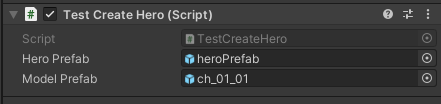
public class TestCreateHero : MonoBehaviour
{
    private GameObject heroPrefab;
    private GameObject modelPrefab;

    void Start()
    {
        this.heroPrefab = Resources.Load<GameObject>("Prefabs/heroPrefab");
        GameObject heroGo = Instantiate(this.heroPrefab);

        this.modelPrefab = Resources.Load<GameObject>("Prefabs/ch_01_01");

        GameObject modelGo = Instantiate(this.modelPrefab);
    }
}
public class TestCreateHero : MonoBehaviour
{
    private GameObject heroPrefab;
    private GameObject modelPrefab;

    void Start()
    {
        this.heroPrefab = Resources.Load<GameObject>("Prefabs/heroPrefab");
        GameObject heroGo = Instantiate(this.heroPrefab);
        this.modelPrefab = Resources.Load<GameObject>("Prefabs/ch_01_01");
        GameObject modelGo = Instantiate(this.modelPrefab);

        modelGo.transform.SetParent(heroGo.transform);
    }
}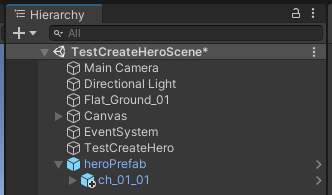
껍데기(Hero)에 모델(ch_01_01)이 들어가 있는 구조
쉘 구조라고 한다
버튼을 눌러 생성하기
using System.Collections;
using System.Collections.Generic;
using UnityEngine;
using UnityEngine.UI;   //버튼 UI사용하기 위한 네임스페이스

public class TestCreateHero : MonoBehaviour
{
    private GameObject modelPrefab;

    //버튼 어싸인
    public Button btnCreateHero;


    void Start()
    {
        this.modelPrefab = Resources.Load<GameObject>("Prefabs/ch_01_01");

        this.btnCreateHero.onClick.AddListener(() => {
            //Debug.Log("click");

            //빈 게임오브젝트 생성
            var go = new GameObject();

            //생성된 게임오브젝트 이름 설정
            go.name = "Hero";

            //(프리팹, 위치) 인스턴스화
            var modelgo = Instantiate<GameObject>(this.modelPrefab, go.transform);

            //생성된 클론 이름 설정
            modelgo.name = "model";
            //modelgo.transform.SetParent(go.transform);    //인스턴스화 될때 위치를 정해주면 사용하지 않아도 된다.


            //Asset폴더에 있는 스크립트라면 추가 가능
            //스크립트 붙임과 동시에 레퍼런스로 즉시 활용 가능

            //히어로 오브젝트에 히어로 스크립트 추가
            var hero = go.AddComponent<Hero>();

            //히어로 오브젝트의 초기화
            hero.Init();
        });
    }
}
| Button.onClick 버튼을 눌렀을 때 트리거되는 UnityEvent 입니다. https://docs.unity3d.com/2019.1/Documentation/ScriptReference/UI.Button-onClick.html UnityEvent.AddListener UnityEvent에 비영구 리스너를 추가합니다. https://docs.unity3d.com/2019.1/Documentation/ScriptReference/Events.UnityEvent.AddListener.html |
'Unity > 게임 엔진 응용 프로그래밍' 카테고리의 다른 글
| [Unity 3D] MiniRPG : 캐릭터 생성과 이동 연결하기 (0) | 2021.10.19 |
|---|---|
| [Unity 3D] MiniRPG : 화면 터치로 이동하기, 애니메이션 (0) | 2021.10.19 |
| 유니티 Resources 폴더 (0) | 2021.10.18 |
| [Unity 3D] MiniRPG : 게임 기획하기 (0) | 2021.10.18 |
| Vertical 2D Shooting 11 : 보스 공격 패턴 (0) | 2021.10.15 |