Bullet 충돌 및 Enemy.Hp가 0이하일때 파괴
Player 및 Enemy 프리팹화
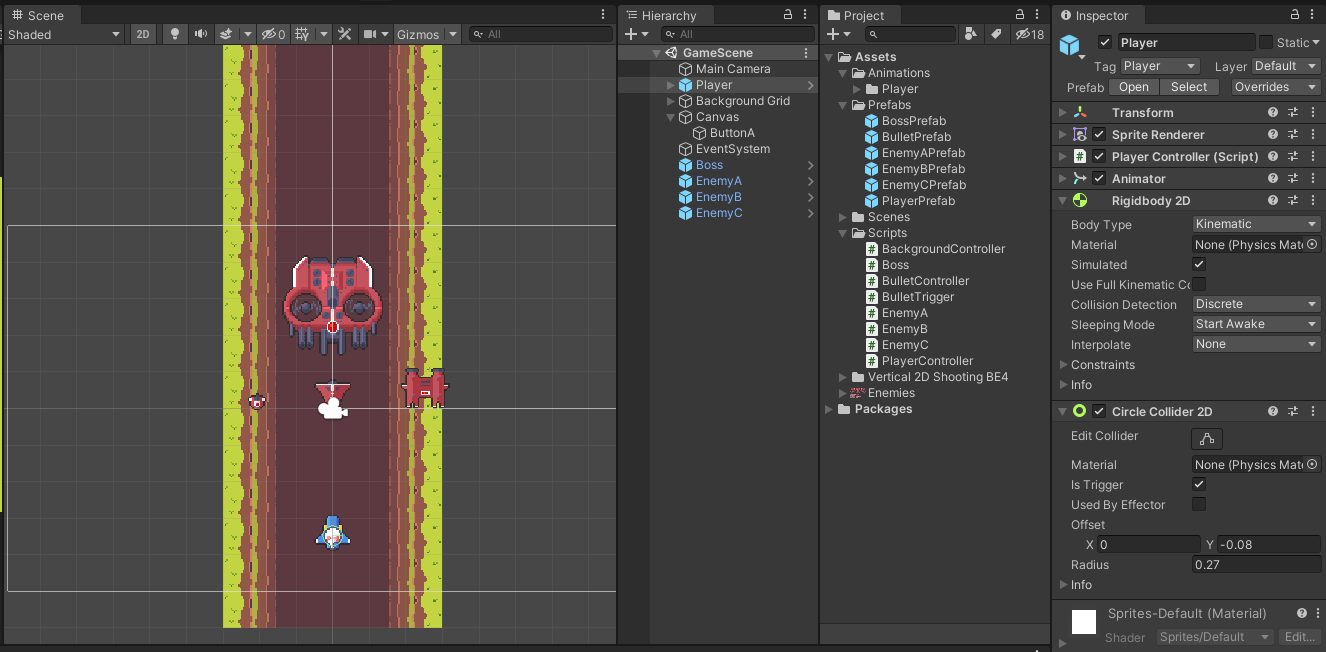
Rigidbody 2D 및 Collider 2D 컴포넌트 추가
Collider 2D의 Is Trigger 체크
Enemy 스크립트
BulletTrigger 스크립트
생성 및 부착
스크립트 수정
using System.Collections;
using System.Collections.Generic;
using UnityEngine;

public class BulletTrigger : MonoBehaviour
{
    public float damage;
    private void OnTriggerEnter2D(Collider2D collision)
    {
        if (collision.CompareTag("Enemy"))
        {
            Destroy(this.gameObject);
            if (collision.gameObject.name == "EnemyA")
            {
                collision.gameObject.GetComponent<EnemyA>().hp -= damage;
                //Destroy(collision.gameObject);
            }
            if (collision.gameObject.name == "EnemyB")
            {
                collision.gameObject.GetComponent<EnemyB>().hp -= damage;
            }
            if (collision.gameObject.name == "EnemyC")
            {
                collision.gameObject.GetComponent<EnemyC>().hp -= damage;
            }
            if (collision.gameObject.name == "Boss")
            {
                collision.gameObject.GetComponent<Boss>().hp -= damage;
            }

        }
    }
}
using System.Collections;
using System.Collections.Generic;
using UnityEngine;
public class EnemyA : MonoBehaviour
{
public float hp;
void Start()
{
}
void Update()
{
if (this.hp <= 0)
{
Destroy(this.gameObject);
}
}
}collision.gameObject.GetComponent<EnemyA>().hp -= damage;
인스턴스화된 프리팹의 멤버변수에 접근하는데 문제가 생김.
1. 전역 변수나 싱글톤 패턴을 사용하는 방법이 있고,
public bool IsUp; 처럼 public으로 선언하고 오브젝트의 레퍼런스를 통해서 얻어오는 방법이 있습니다.
Floor가 Player의 레퍼런스를 가지고 있어도 되고, Find류의 함수로 찾아와도 됩니다. 함수에 따라 검색 대상이되는 오브젝트가 많은 경우에는 비효율적일 수 있다고 알고 있습니다. 한번만 하고 레퍼런스를 멤버변수로 가지고 있게 하셔도 됩니다.
var obj = FindGameObjectsWithTag("tagname")
var player = GetComponent();
if ( player.IsUp ) ...
2. 네. SetActive 사용하시는게 맞다고 생각합니다.
http://www.devkorea.co.kr/bbs/board.php?bo_table=m03_qna&wr_id=94529
데브코리아
한국 게임개발자 커뮤니티
www.devkorea.co.kr
를 참고하여 Enemy가 Bullet을 가지고 있기로 함.
http://www.devkorea.co.kr/bbs/board.php?bo_table=m03_qna&wr_id=84638
데브코리아
한국 게임개발자 커뮤니티
www.devkorea.co.kr
[Unity] 부모 오브젝트, 자식 오브젝트 가져오기(Script)
Father(최상위 오브젝트) Middle(중간 오브젝트) Chlid1(하위 오브젝트) Chlid2(하위 오브젝트) 라는 구조의 오브젝트가 있다면 Middle에서 스크립트로 아래와 같이 작성하면 부모와 자식 객체를 가져올
guks-blog.tistory.com
프리팹의 자식 찾기.
프리팹의 자식을 찾고
GameObject.transform.GetChild(int Index)
자식의 컴포넌트에 접근하여 필드 가져옴.
GameObject.GetComponent<BulletTrigger>().damage //<컴포넌트>().필드
using System.Collections;
using System.Collections.Generic;
using UnityEngine;

public class EnemyA : MonoBehaviour
{
    public float hp;
    public GameObject playerBullet;
    public GameObject playerMainBullet;
    public GameObject playerSubBullet;
    void Start()
    {
        this.playerSubBullet = this.playerBullet.transform.GetChild(0).gameObject;
        this.playerMainBullet = this.playerBullet.transform.GetChild(1).gameObject;
    }

    void Update()
    {
        this.transform.Translate(Vector2.down * 2 * Time.deltaTime);

        //처치당하면
        if (this.hp <= 0)
        {
            Destroy(this.gameObject);
        }

        //화면밖으로 나가면
        if (this.gameObject.transform.position.y <= -6.0f)
        {
            Destroy(this.gameObject);
        }
    }
    private void OnTriggerEnter2D(Collider2D collision)
    {
        if (collision.CompareTag("Bullet"))
        {
            //this.hp -= 1;     //총알 데미지
            if (collision.gameObject.name == "SubBullet")
            {
                this.hp -= this.playerSubBullet.GetComponent<BulletTrigger>().damage;
            }
            if (collision.gameObject.name == "MainBullet")
            {
                this.hp -= this.playerMainBullet.GetComponent<BulletTrigger>().damage;
            }
        }
    }
}
'Unity > 게임 엔진 응용 프로그래밍' 카테고리의 다른 글
| Vertical 2D Shooting 07 : UI 일부 구현 (점수, 생명) (0) | 2021.10.14 |
|---|---|
| Vertical 2D Shooting 06 : 적기 자동생성, 피격 애니메이션 (0) | 2021.10.14 |
| Vertical 2D Shooting 04 : 레이어된 배경 스크롤링 (0) | 2021.10.13 |
| Vertical 2D Shooting 03 : 플레이어 공격 (0) | 2021.10.13 |
| Vertical 2D Shooting 02 : 플레이어 이동 (0) | 2021.10.13 |