키보드(A키)를 누르면 공격한다 구현하기
UI.Button
버튼 UI생성하고 눌러보기
하이어라키 창 -> +또는 우클릭 -> UI -> Button

이름 변경 -> Text삭제
버튼 리소스를 사용하므로 Text는 필요하지 않다.
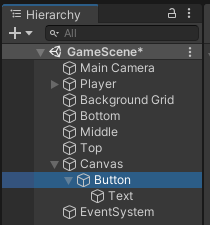
버튼 선택
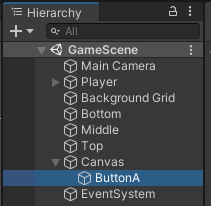
버튼 리소스를 인스펙터 창안에 있는 Image컴포넌트 -> Source Image에 드래그 & 드롭
Width, Height 설정 및 앵커, 포지션 설정

실행해서 버튼 눌리는지 확인 해보기
버튼을 눌렀을 때 공격하기
1. 버튼을 눌렀을 때 호출시킬 메서드를 만든다
2. 버튼에 해당하는 메서드를 등록
1. 버튼을 눌렀을 때 호출시킬 메서드를 만든다
using System.Collections;
using System.Collections.Generic;
using UnityEngine;
using UnityEngine.UI;

public class PlayerController : MonoBehaviour
{
    void Start()
    {
    }

    void Update()
    {
    }

    public void Shoot()
    {
        Debug.Log("Shoot");
    }
}
2. 버튼에 해당하는 메서드를 등록
하이어라키 창에서 ButtonA(UI) 선택
인스펙터창의 OnClick ()의 +클릭

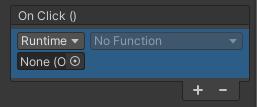
하이어라키 창에서 Player를 None (Object)로 드래그 & 드롭
(Player는 메서드가 작성된 스크립트가 부착되어있는 오브젝트)
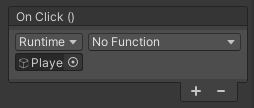
No Function에서 PlayerController를 선택하면 1에서 작성한 메서드가 보여진다. Shoot() 선택

보이지 않는다면 해당 메서드의 접근제한자를 확인하자

실행해서 버튼을 눌렀을때 메서드가 출력되는지 확인
OnClick() 한번만 실행된다
| Button 이벤트를 트리거하기 위해 클릭할 수 있는 일반적인 버튼입니다. 선택 상태에 대한 것은 Selectable 클래스를 참조하십시오. https://docs.unity3d.com/kr/530/ScriptReference/UI.Button.html |
누르고 있는동안 공격이 되게 만들자
//시간을 저장
float delta;
//시간이 span만큼 누적되면 발사
float span = 0.25;
| Time.deltaTime; public static float deltaTime; Description 지난 프레임이 완료되는 데 까지 걸린 시간을 나타내며, 단위는 초를 사용합니다. (읽기전용) https://docs.unity3d.com/kr/530/ScriptReference/Time-deltaTime.html |
OnClick() 한번만 실행되기 때문에 누르는 동안 계속 실행할수 없다.
버튼이 눌렸을때와 뗐을때를 감지할수 있는 Event Trigger를 사용하자
하이어라키 창의 ButtonA를 선택
인스펙터 창에서 Add Component 클릭 -> Event -> Event Trigger
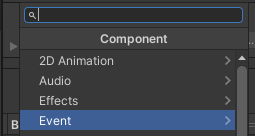
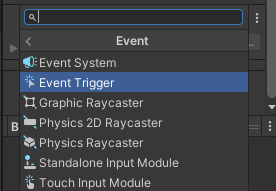
Event Trigger -> Add New Event Type
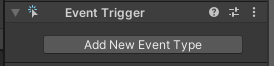
PointerDown 추가 (눌렸을 때를 감지)
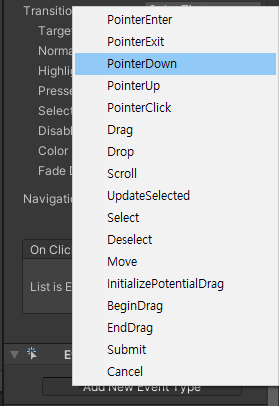
PointerUp 추가 (뗐을 때를 감지)

이벤트 트리거가 생성된 모습
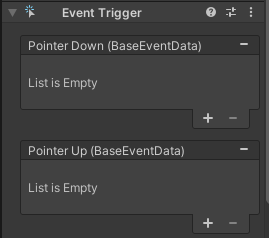
각 이벤트 트리거에 + 클릭
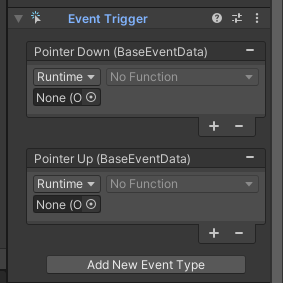
OnClick과 동일
하이어라키 창에서 Player를 None (Object)로 드래그 & 드롭
(Player는 메서드가 작성된 스크립트가 부착되어있는 오브젝트)
No Function에서 PlayerController를 선택하면 메서드가 보여진다
각 이벤트 트리거에 메서드 연결

using System.Collections;
using System.Collections.Generic;
using UnityEngine;
using UnityEngine.UI;

public class PlayerController : MonoBehaviour
{
    Animator animator;

    bool isShootButtonDwon = false;

    //시간누적
    float delta;
    //Shot간격
    float span = 0.25f;


    void Start()
    {
    }

    void Update()
    {
        //공격한다
        if (this.isShootButtonDwon)
        {
            //시간누적
            this.delta += Time.deltaTime;

            //Shot간격
            if (this.delta > this.span)
            {
                this.Shoot();
                //시간초기화
                this.delta = 0;
            }
        }

    }
    //눌렀을때와 뗐을때를 분리
    public void OnShootButtonDown()
    {
        Debug.Log("start shoot");
        this.isShootButtonDwon = true;
    }
    public void OnShootButtonUp()
    {
        Debug.Log("stop shoot");
        this.isShootButtonDwon = false;
    }
    public void Shoot()
    {
        delta = Time.deltaTime;
        Debug.Log("Shoot");
    }
}
프리팹과 제너레이터를 이용하여 공격 오브젝트 만들기
Prefab만들기
빈 오브젝트 만들기 -> 이름변경 Bullet
리소스 추가
Center Bullet
Left Bullet
Right Bullet
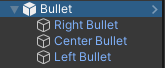
하이어라키 창의 Bullet오브젝트 프로젝트 창으로 드래그&드롭(프리팹화)
하이어라키 창에 남아있는 Bullet오브젝트를 제거한다
프로젝트 창의 Bullet 프리팹의 이름을 BulletPrefab로 변경
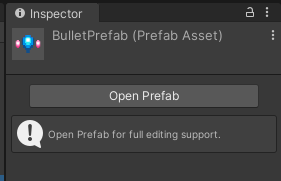
인스펙터창의 Open Prefab을 클릭해서 수정이 가능

Generator 스크립트 만들기


Bullet Prefab 변수에 Bullet Prefab 드래그 & 드롭
Player가 Bullet을 생성함
public void Shoot()
    {
        GameObject bulletGo = Instantiate(BulletPrefab) as GameObject;
        bulletGo.transform.position = this.BulletPoint.transform.position;
    }
BulletController 작성
using System.Collections;
using System.Collections.Generic;
using UnityEngine;

public class BulletController : MonoBehaviour
{
    public float speed;
    void Update()
    {
        //float speed = 10f;
        this.transform.Translate(Vector2.up * this.speed * Time.deltaTime);

        //화면을 벗어나면 파괴
        if (this.transform.position.y > 5.5f)
        {
            Destroy(this.gameObject);
        }
    }
}
Player를 Prefab화 하면
ButtonA의 Event Trigger에 문제가 생긴다.
이벤트 트리거에 연결된 오브젝트가 프리팹 파일의 정보기 때문에
프리팹 인스턴스에게 영향을 줄 수 없다.
(해결중)
https://docs.unity3d.com/kr/current/ScriptReference/EventSystems.EventTriggerType.html
EventTriggerType - Unity 스크립팅 API
The type of event the TriggerEvent is intercepting.
docs.unity3d.com
https://m.blog.naver.com/PostView.naver?isHttpsRedirect=true&blogId=zparkx&logNo=220671768007
[람다식] EventTrigger에 Script로 추가하기.
EventTrigger이벤트 트리거는 일반적인 Canvas객체에 입력 이벤트를 추가하는 컴포넌트입니다만 스크립...
blog.naver.com
using UnityEngine.EventSystems;

this.ButtonA = GameObject.Find("ButtonA");
EventTrigger bte = this.ButtonA.GetComponent<EventTrigger>();
bte.OnPointerDown();
아직 해결 못함
'Unity > 게임 엔진 응용 프로그래밍' 카테고리의 다른 글
| Vertical 2D Shooting 05 : 적기 파괴 (0) | 2021.10.13 |
|---|---|
| Vertical 2D Shooting 04 : 레이어된 배경 스크롤링 (0) | 2021.10.13 |
| Vertical 2D Shooting 02 : 플레이어 이동 (0) | 2021.10.13 |
| Vertical 2D Shooting 01 : 게임기획 (0) | 2021.10.13 |
| Unity : SwipeCar / UI(캔버스 좌표계) (0) | 2021.10.13 |