Animation의 재생 알아보기
-코루틴 사용법
-애니메이션 이벤트
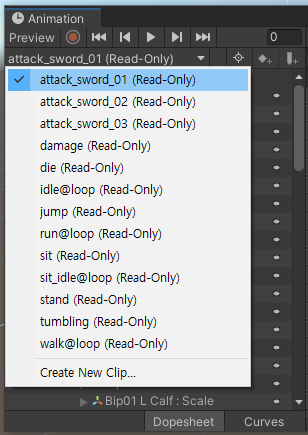
버튼을 누르면 애니메이션이 재생
using System.Collections;
using System.Collections.Generic;
using UnityEngine;
using UnityEngine.UI;

public class TestHeroAnimation : MonoBehaviour
{
    public Button btnAttack;    //어싸인하기

    //애니메이션을 가지고 있는 게임오브젝트의 애니메이션 컴포넌트를 할당해준다
    public Animation anim;  //어싸인하기

    private void Start()
    {
        this.btnAttack.onClick.AddListener(() => {
            this.anim.Play("attack_sword_01");
        });
    }

}| //해당 이름을 가진 애니메이션 재생 this.anim.Play("attack_sword_01"); |
애니메이션의 속도 조절
using System.Collections;
using System.Collections.Generic;
using UnityEngine;
using UnityEngine.UI;

public class TestHeroAnimation : MonoBehaviour
{
    public Animation anim;

    private void Start()
    {
        AnimationState attackState = anim["attack_sword_01"];

        attackState.speed = 2;
    }
}| //Animatio의 이름(인덱스)으로 AnimationState에 접근할 수 있다. AnimationState attackState = anim["attack_sword_01"]; //AnimationState.speed로 재생속도를 조절할 수 있다. attackState.speed = 2; |
애니메이션의 길이
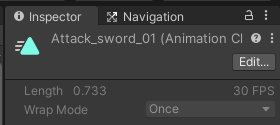
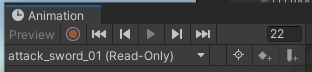
30 FPS 일때 재생시간 : 1초
22프레임이기 때문에 : 0.733초
AnimationClip.length로 쉽게 알수 있다.
| AnimationClip.length 애니메이션의 초단위 길이를 나타냅니다.(읽기전용) https://docs.unity3d.com/kr/530/ScriptReference/AnimationClip-length.html |
코루틴으로 공격 애니메이션의 끝나는시간 설정
using System.Collections;
using System.Collections.Generic;
using UnityEngine;
using UnityEngine.UI;

public class TestHeroAnimation : MonoBehaviour
{
    public Button btnAttack;
    public Animation anim;

    private void Start()
    {
        AnimationState attackState = anim["attack_sword_01"];
        this.btnAttack.onClick.AddListener(() =>
        {
            this.anim.Play("attack_sword_01");
            if (routine != null) //코루틴이 실행되고 있다면
            {
                StopCoroutine(this.routine);    //코루틴 종료
            }
            StartCoroutine(this.WaitForAttackAnimationComplete(attackState.clip.length));
        });
    }

    //코루틴이 실행되고 있는지를 확인하기 위한 필드
    private Coroutine routine;

    //공격 모션이 끝나는 시간
    IEnumerator WaitForAttackAnimationComplete(float length)
    {
        yield return new WaitForSeconds(length);
        Debug.Log("공격 애니메이션 완료");
    }
}| //clip.length(재생시간)를 매개변수로하는 코루틴 시작 StartCoroutine(Coroutine(attackState.clip.length)); ---------------------------------------------------------------------------------------------------------------------------------------- //clip.length를 매개변수로 받아 해당 시간동안 코루틴 실행 IEnumerator WaitForAttackAnimationComplete(float length) { yield return new WaitForSeconds(length); //해당 시간을 기다렸다 다음 프래임으로 넘김 Debug.Log("공격 애니메이션 완료"); } ---------------------------------------------------------------------------------------------------------------------------------------- //코루틴이 실행되고 있는지를 확인하기 위한 필드 private Coroutine routine; //코루틴의 중복 실행을 방지 if (routine != null) //코루틴이 실행되고 있다면 { StopCoroutine(this.routine); //코루틴 종료 } |
실제 공격프레임 확인하기
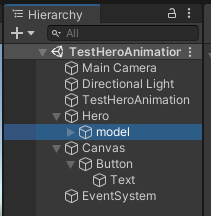
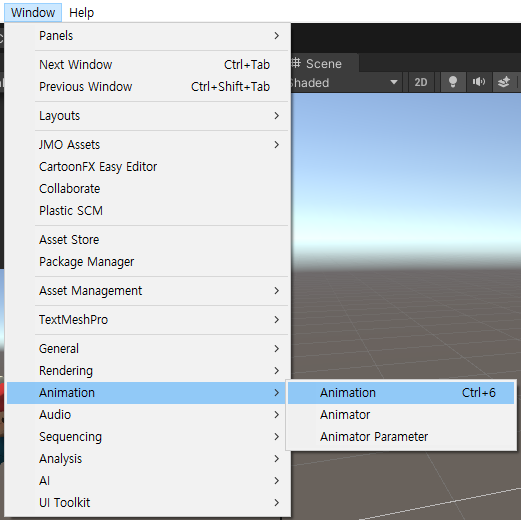
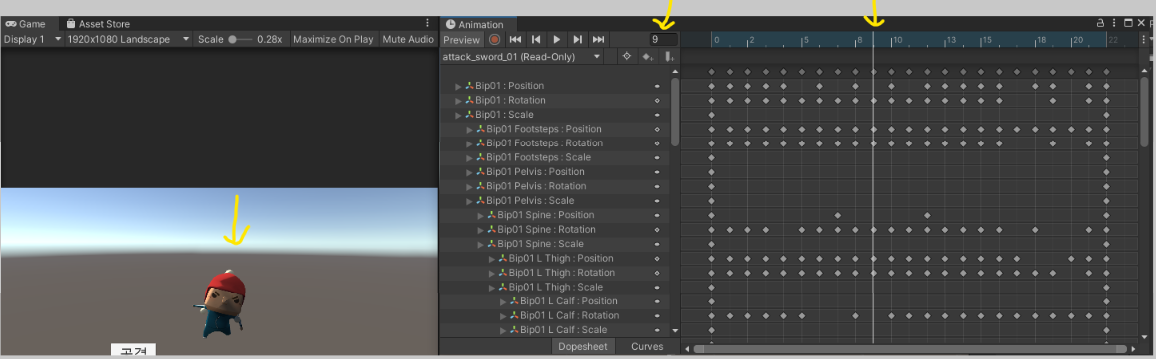
프레임을 움직여 보면서 모션 확인
타격 이펙트가 나갈 프레임 확인
보통은 해당 프레임에

Add event로 이벤트를 추가 할 수 있지만
외부 리소스라서 추가가 불가능
using System.Collections;
using System.Collections.Generic;
using UnityEngine;
using UnityEngine.UI;

public class TestHeroAnimation : MonoBehaviour
{
    public Button btnAttack;    //어싸인하기

    //애니메이션을 가지고 있는 게임오브젝트의 애니메이션 컴포넌트를 할당해준다
    public Animation anim;  //어싸인하기
    public const int IMPACT_FRAME = 9;
    private float impactTime;

    private void Start()
    {

        AnimationState attackState = anim["attack_sword_01"];

        Debug.Log("->" + attackState.clip.length);  //해당 클립의 재생시간(sec)
        Debug.Log("->" + attackState.clip.frameRate);   //30
        this.impactTime = IMPACT_FRAME / attackState.clip.frameRate;
        Debug.Log("->" + impactTime);   //0.3

        //attackState.speed = 2;


        this.btnAttack.onClick.AddListener(() =>
        {
            this.anim.Play("attack_sword_01");
            if (routine != null) //코루틴이 실행되고 있다면
            {
                StopCoroutine(this.routine);    //코루틴 종료
            }
            StartCoroutine(this.WaitForAttackAnimationComplete(attackState.clip.length));
        });
    }

    //코루틴이 실행되고 있는지를 확인하기 위한 필드
    private Coroutine routine;

    //공격 모션이 끝나는 시간
    IEnumerator WaitForAttackAnimationComplete(float length)
    {
        yield return new WaitForSeconds(this.impactTime);
        Debug.LogError("타격 !!!");   //콘솔창의 Error Pause를 켜두면 Error지점에서 일시정지 가능, 타격지점 확인용

        yield return new WaitForSeconds(length - this.impactTime);
        Debug.LogError("공격 애니메이션 완료");
    }
}| Debug.LogError("타격 !!!"); //콘솔창의 Error Pause를 켜두면 Error지점에서 일시정지 가능, 타격지점 확인용 |
Animation Doc
using UnityEngine;
using System.Collections;

public class ExampleClass : MonoBehaviour {
    public Animation anim;
    void Start() {
        anim = GetComponent<Animation>();
        foreach (AnimationState state in anim) {
            state.speed = 0.5F;
        }
    }
}
Animation은 foreach이 사용가능하다
- Animation의 요소는 AnimationState다.
-IEnumerator을 구현하고 있다(상속 받고있다).
-인덱서로 되어있다.
-인덱서로 접근이 가능하다.
https://docs.unity3d.com/kr/530/ScriptReference/Animation.html
Unity - 스크립팅 API: Animation
사용자는 애니메이션 컴포넌트에 애니메이션 클립을 할당할 수 있고, 스크립트를 통해서 재생관련 기능을 조절할 수 있습니다. Unity의 에니메이션 시스템은 weight-based입니다. 그리고, 애니메이
docs.unity3d.com
https://docs.unity3d.com/kr/530/ScriptReference/AnimationState.html
Unity - 스크립팅 API: AnimationState
대부분의 경우 Animation 인터페이스는 충분하고 사용하기 쉽습니다. 애니메이션을 재생하는 과정에서 애니메이션 블렌딩에 대한 모든 제어 기능이 필요한 경우라면 AnimationState를 사용하십시오. A
docs.unity3d.com
최종코드
using System.Collections;
using System.Collections.Generic;
using UnityEngine;
using UnityEngine.UI;

public class TestHeroAnimation : MonoBehaviour
{
    public Button btnAttack;    //어싸인하기

    //애니메이션을 가지고 있는 게임오브젝트의 애니메이션 컴포넌트를 할당해준다
    public Animation anim;  //어싸인하기
    public const int IMPACT_FRAME = 9;
    private float impactTime;

    private void Start()
    {

        //AnimationState attackState = null;
        //foreach (AnimationState state in this.anim)
        //{
        //    //Debug.Log(state.clip.name);
        //    if (state.clip.name == "attack_sword_01")
        //    {
        //        Debug.Log(state.clip.name);
        //        break;
        //    }
        //}

        AnimationState attackState = anim["attack_sword_01"];

        Debug.Log("->" + attackState.clip.length);  //해당 클립의 재생시간(sec)
        Debug.Log("->" + attackState.clip.frameRate);   //30
        this.impactTime = IMPACT_FRAME / attackState.clip.frameRate;
        Debug.Log("->" + impactTime);   //0.3


        //공격속도 스텟 반영
        //attackState.speed = 2;


        this.btnAttack.onClick.AddListener(() =>
        {
            this.anim.Play("attack_sword_01");
            if (routine != null) //코루틴이 실행되고 있다면
            {
                StopCoroutine(this.routine);    //코루틴 종료
            }
            StartCoroutine(this.WaitForAttackAnimationComplete(attackState.clip.length));
        });
    }

    //코루틴이 실행되고 있는지를 확인하기 위한 필드
    private Coroutine routine;

    //공격 모션이 끝나는 시간
    IEnumerator WaitForAttackAnimationComplete(float length)
    {
        yield return new WaitForSeconds(this.impactTime);
        //타격

        yield return new WaitForSeconds(length - this.impactTime);
        //완료
    }
}
'Unity > 게임 엔진 응용 프로그래밍' 카테고리의 다른 글
| [Unity 3D] MiniRPG : 랜덤한 위치에 몬스터 생성 (0) | 2021.10.22 |
|---|---|
| [Unity 3D] MiniRPG : 몬스터와 전투 (0) | 2021.10.20 |
| [Unity 3D] MiniRPG : 캐릭터 생성과 이동 연결하기 (0) | 2021.10.19 |
| [Unity 3D] MiniRPG : 화면 터치로 이동하기, 애니메이션 (0) | 2021.10.19 |
| [Unity 3D] MiniRPG : 캐릭터 생성(프리팹 로드하기) (0) | 2021.10.19 |