프리팹
게임오브젝트가 파일화된것
(하이어라키에서 -> 프로젝트로)
프리팹 -> 하이러라키
프리팹의 인스턴스화
프리팹을 지우게되면 하이어라키의 게임오브젝트가 빨개진다.
우클릭 프리팹 언팩으로 끊을 수 있다.
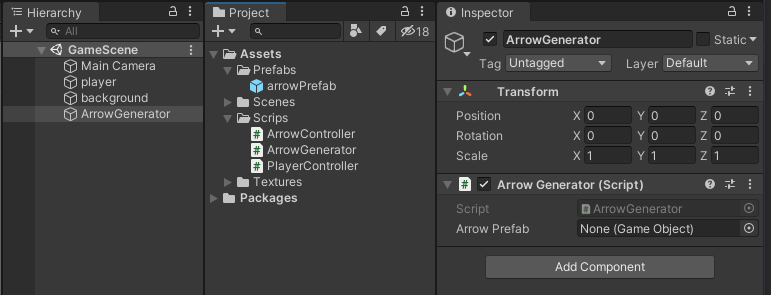

초기화 하지 않은 필드는(최값인 필드?) 인스펙터에서 비어있는 상태로 로드된다.
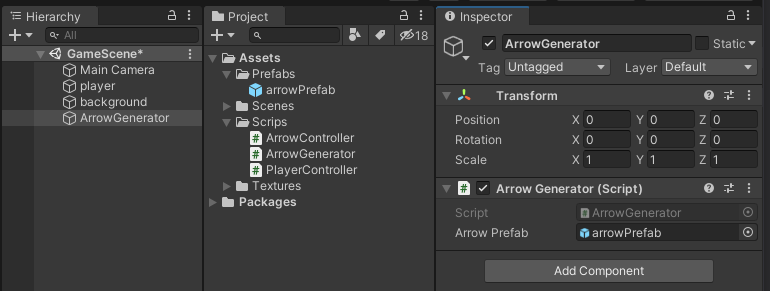
게임오브젝트 프리팹 등을 드래그 드롭으로 할당할수 있다.
코드
using System.Collections;
using System.Collections.Generic;
using UnityEngine;

public class PlayerController : MonoBehaviour
{
    // Start is called before the first frame update
    void Start()
    {

    }

    // Update is called once per frame
    void Update()
    {
        //왼쪽 화살표가 눌렸을때
        if(Input.GetKeyDown(KeyCode.LeftArrow))
        {
            this.transform.Translate(-3, 0, 0);
        }

        //오른쪽 화살표가 눌렸을때
        if (Input.GetKeyDown(KeyCode.RightArrow))
        {
            this.transform.Translate(3, 0, 0);
        }
    }
}
using System.Collections;
using System.Collections.Generic;
using UnityEngine;
public class ArrowController : MonoBehaviour
{
private GameObject player;
// Start is called before the first frame update
void Start()
{
this.player = GameObject.Find("player");
}
// Update is called once per frame
void Update()
{
this.transform.Translate(0, -0.1f, 0);
if (this.transform.position.y <= -4.06f)
{
Destroy(this.gameObject);
}
Vector2 p1 = this.transform.position;
Vector2 p2 = this.player.transform.position;
Vector2 dir = p1 - p2;
float distance = dir.magnitude;
float r1 = 0.5f; //arrow 반지름
float r2 = 1f; //player 반지름
if (distance < r1 + r2)
{
GameObject directorGo = GameObject.Find("GameDirector");
GameDirector director = directorGo.GetComponent<GameDirector>();
director.DecreaseHp();
//충돌
Destroy(this.gameObject);
}
}
}using System.Collections;
using System.Collections.Generic;
using UnityEngine;
public class ArrowGenerator : MonoBehaviour
{
public GameObject arrowPrefab;
float span = 1.0f;
float delta = 0f;
void Update()
{
this.delta += Time.deltaTime; //매프레임마다 경과시간을 누적
if (this.delta > this.span) //1초를 넘었다면
{
//누적시간 초기화
this.delta = 0;
//프리팹의 인스턴스를 생성한다
GameObject go = Instantiate(arrowPrefab) as GameObject;
int px = Random.Range(-6, 7);
go.transform.position = new Vector3(px, 7, 0);
}
}
}using System.Collections;
using System.Collections.Generic;
using UnityEngine;
using UnityEngine.UI;
public class GameDirector : MonoBehaviour
{
private GameObject hpGauge;
// Start is called before the first frame update
void Start()
{
this.hpGauge = GameObject.Find("hpGauge");
}
// Update is called once per frame
public void DecreaseHp()
{
Image image = this.hpGauge.GetComponent<Image>();
image.fillAmount -= 0.1f;
}
}hp가 0이하일때 화살 생성 멈춤
using System.Collections;
using System.Collections.Generic;
using UnityEngine;
using UnityEngine.UI;

public class GameDirector : MonoBehaviour
{
    private GameObject hpGauge;

    // Start is called before the first frame update
    void Start()
    {
        this.hpGauge = GameObject.Find("hpGauge");
    }

    // Update is called once per frame
    public void DecreaseHp()
    {
        Image image = this.hpGauge.GetComponent<Image>();
        image.fillAmount -= 0.2f;
    }
}
using System.Collections;
using System.Collections.Generic;
using UnityEngine;
using UnityEngine.UI;
public class ArrowGenerator : MonoBehaviour
{
public GameObject arrowPrefab;
float span = 1.0f;
float delta = 0f;
GameObject hpGauge;
Image hp;
void Start()
{
this.hpGauge = GameObject.Find("hpGauge");
}
void Update()
{
this.delta += Time.deltaTime; //매프레임마다 경과시간을 누적
if (this.delta > this.span) //1초를 넘었다면
{
hp = this.hpGauge.GetComponent<Image>();
//hp가 0이상이라면
if (hp.fillAmount > 0)
{
//누적시간 초기화
this.delta = 0;
//프리팹의 인스턴스를 생성한다
GameObject go = Instantiate(arrowPrefab) as GameObject;
int px = Random.Range(-6, 7);
go.transform.position = new Vector3(px, 7, 0);
}
}
}
}using System.Collections;
using System.Collections.Generic;
using UnityEngine;
public class ArrowController : MonoBehaviour
{
private GameObject player;
// Start is called before the first frame update
void Start()
{
this.player = GameObject.Find("player");
}
// Update is called once per frame
void Update()
{
this.transform.Translate(0, -0.1f, 0);
if (this.transform.position.y <= -4.06f)
{
Destroy(this.gameObject);
}
Vector2 p1 = this.transform.position;
Vector2 p2 = this.player.transform.position;
Vector2 dir = p1 - p2;
float distance = dir.magnitude;
float r1 = 0.5f; //arrow 반지름
float r2 = 1f; //player 반지름
//충돌
if (distance < r1 + r2)
{
GameObject directorGo = GameObject.Find("GameDirector");
GameDirector director = directorGo.GetComponent<GameDirector>();
director.DecreaseHp();
Destroy(this.gameObject);
}
}
}using System.Collections;
using System.Collections.Generic;
using UnityEngine;
using UnityEngine.UI;
public class PlayerController : MonoBehaviour
{
GameObject hpGauge;
Image hp;
// Start is called before the first frame update
void Start()
{
this.hpGauge = GameObject.Find("hpGauge");
}
// Update is called once per frame
void Update()
{
hp = this.hpGauge.GetComponent<Image>();
//hp가 0이상이라면
if (hp.fillAmount > 0)
{
//왼쪽 화살표가 눌렸을때
if (Input.GetKeyDown(KeyCode.LeftArrow))
{
if (this.transform.position.x > -7.95 + 3)
{
this.transform.Translate(-3, 0, 0);
}
else
{
//왼쪽 리미트
this.transform.position = new Vector3(-7.95f, -3.61f, 0);
}
}
//오른쪽 화살표가 눌렸을때
if (Input.GetKeyDown(KeyCode.RightArrow))
{
if (this.transform.position.x < 7.98 - 3)
{
this.transform.Translate(3, 0, 0);
}
else
{
//오른쪽 리미트
this.transform.position = new Vector3(7.98f, -3.61f, 0);
}
}
}
}
}
리미트 작성시 참고
https://docs.unity3d.com/kr/530/ScriptReference/Mathf.Clamp.html
Unity - 스크립팅 API: Mathf.Clamp
public static function Clamp(value: float, min: float, max: float): float; public static float Clamp(float value, float min, float max);
docs.unity3d.com
using System.Collections;
using System.Collections.Generic;
using UnityEngine;
using UnityEngine.UI;

public class GameDirector : MonoBehaviour
{
    private GameObject survivalTimes;
    private GameObject hpGauge;
    private GameObject gameOver;
    float delta = 0f;

    // Start is called before the first frame update
    void Start()
    {
        this.survivalTimes = GameObject.Find("survivalTime");
        this.hpGauge = GameObject.Find("hpGauge");
        this.gameOver = GameObject.Find("gameOver");
    }

    // Update is called once per frame
    private void Update()
    {
        this.delta += Time.deltaTime;   //매프레임마다 경과시간을 누적
        Text text = this.survivalTimes.GetComponent<Text>();
        text.text = string.Format("{0}", delta);
    }
    public void DecreaseHp()
    {
        Image image = this.hpGauge.GetComponent<Image>();
        image.fillAmount -= 0.4f;
    }
}
using System.Collections;
using System.Collections.Generic;
using UnityEngine;
using UnityEngine.UI;
public class ArrowGenerator : MonoBehaviour
{
public GameObject arrowPrefab;
float span = 1.0f;
float delta = 0f;
GameObject hpGauge;
Image hp;
void Start()
{
this.hpGauge = GameObject.Find("hpGauge");
}
void Update()
{
this.delta += Time.deltaTime; //매프레임마다 경과시간을 누적
if (this.delta > this.span) //1초를 넘었다면
{
hp = this.hpGauge.GetComponent<Image>();
//hp가 0이상이라면
if (hp.fillAmount > 0)
{
//누적시간 초기화
this.delta = 0;
//프리팹의 인스턴스를 생성한다
GameObject go = Instantiate(arrowPrefab) as GameObject;
int px = Random.Range(-8, 8);
go.transform.position = new Vector3(px, 7, 0);
}
}
}
}using System.Collections;
using System.Collections.Generic;
using UnityEngine;
public class ArrowController : MonoBehaviour
{
private GameObject player;
// Start is called before the first frame update
void Start()
{
this.player = GameObject.Find("player");
}
// Update is called once per frame
void Update()
{
this.transform.Translate(0, -0.1f, 0);
if (this.transform.position.y <= -4.06f)
{
Destroy(this.gameObject);
}
Vector2 p1 = this.transform.position;
Vector2 p2 = this.player.transform.position;
Vector2 dir = p1 - p2;
float distance = dir.magnitude;
float r1 = 0.5f; //arrow 반지름
float r2 = 1f; //player 반지름
//충돌
if (distance < r1 + r2)
{
GameObject directorGo = GameObject.Find("GameDirector");
GameDirector director = directorGo.GetComponent<GameDirector>();
director.DecreaseHp();
Destroy(this.gameObject);
}
}
}using System.Collections;
using System.Collections.Generic;
using UnityEngine;
using UnityEngine.UI;
public class PlayerController : MonoBehaviour
{
GameObject hpGauge;
Image hp;
//GameObject Canvas;
GameObject gameOver;
// Start is called before the first frame update
void Start()
{
this.hpGauge = GameObject.Find("hpGauge");
//this.Canvas = GameObject.Find("Canvas");
//this.gameOver = this.Canvas.transform.Find("gameOver").gameObject;
this.gameOver = GameObject.Find("Canvas").transform.Find("gameOver").gameObject;
}
// Update is called once per frame
void Update()
{
hp = this.hpGauge.GetComponent<Image>();
//hp가 0이상이라면
if (hp.fillAmount > 0)
{
//왼쪽 화살표가 눌렸을때
if (Input.GetKeyDown(KeyCode.LeftArrow))
{
if (this.transform.position.x > -7.95 + 3)
{
this.transform.Translate(-3, 0, 0);
}
else
{
//왼쪽 리미트
this.transform.position = new Vector3(-7.95f, -3.61f, 0);
}
}
//오른쪽 화살표가 눌렸을때
if (Input.GetKeyDown(KeyCode.RightArrow))
{
if (this.transform.position.x < 7.98 - 3)
{
this.transform.Translate(3, 0, 0);
}
else
{
//오른쪽 리미트
this.transform.position = new Vector3(7.98f, -3.61f, 0);
}
}
}
else
{
this.gameOver.SetActive(true);
}
}
}'Unity > 게임 엔진 응용 프로그래밍' 카테고리의 다른 글
| Vertical 2D Shooting 02 : 플레이어 이동 (0) | 2021.10.13 |
|---|---|
| Vertical 2D Shooting 01 : 게임기획 (0) | 2021.10.13 |
| Unity : SwipeCar / UI(캔버스 좌표계) (0) | 2021.10.13 |
| Unity : 룰렛 프로젝트 (0) | 2021.10.10 |
| 룰렛 프로젝트 : 룰렛 회전, 멈춤 (0) | 2021.10.04 |